MCP Server for CRM & Invoicing: Connect Claude Desktop & Cursor
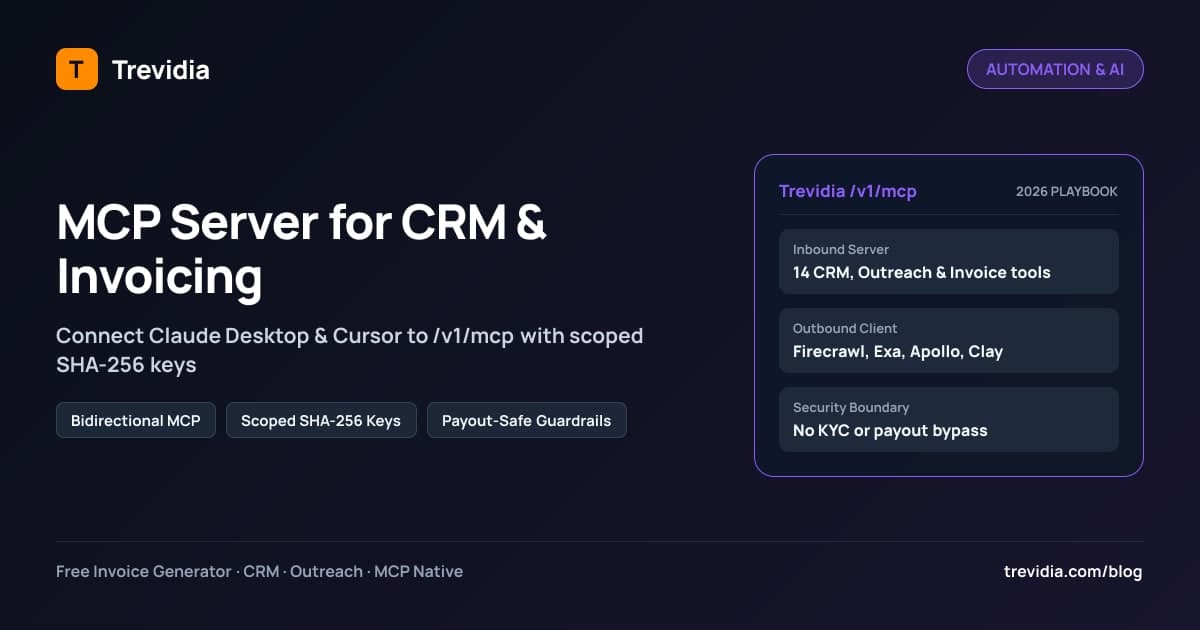
An MCP server for CRM and invoicing exposes structured tools, live workspace resources, and reusable prompts over the open Model Context Protocol (MCP) so AI applications like Claude Desktop, Cursor, Windsurf, and Google Antigravity can search leads, trigger DNS MX classification, preview outreach steps, log warm-up tasks, and draft invoices directly—without brittle copy-pasting or custom REST wrappers.
Most teams try to bolt AI onto growth workflows by copying prospect bios out of spreadsheets, pasting them into chat windows, and copying drafts back into four separate SaaS tabs. Bidirectional MCP eliminates that manual copy-paste loop while keeping strict cryptographic authentication and financial controls over what AI is allowed to touch.
Bidirectional MCP Architecture: Inbound Server + Outbound GTM Client
Most SaaS tools ship half an integration—either letting an LLM query read-only contacts or running isolated enrichment prompts. A full bidirectional MCP architecture connects both directions cleanly:
  [External AI Clients: Claude Desktop / Cursor / Windsurf / n8n]
                         │
                         │ Streamable HTTP (/v1/mcp)
                         │ Bearer trv_mcp_live_... (SHA-256 + Scopes)
                         ▼
  ┌──────────────────────────────────────────────────────────────────┐
  │                 TREVIDIA INBOUND MCP SERVER                      │
  │  Tools: CRM · Outreach Preview · Warm-Up Tasks · Meet · Invoices │
  │  Guardrail: VerifiedClientGuard + NO Cash Payout / KYC Bypass    │
  └──────────────────────────────────────────────────────────────────┘
                         ▲
                         │ @anthropic-ai/sdk + @modelcontextprotocol/sdk
                         │ Atomic Credit Ledger (SELECT ... FOR UPDATE)
                         ▼
  ┌──────────────────────────────────────────────────────────────────┐
  │             TREVIDIA OUTBOUND GTM MCP CLIENT HUB                 │
  │  Firecrawl Scraper · Exa / Brave Search · Apollo / Clay · Slack  │
  └──────────────────────────────────────────────────────────────────┘
How Both Sides Work Together
- Inbound Server (
/v1/mcp): Lets your preferred AI editor or assistant operate Trevidia directly—asking Claude Desktop "Show my overdue invoices, log 2 warm-up comments, and draft a consulting invoice for Acme" executes verified backend tools in seconds. - Outbound GTM Client Hub (
MCP_SERVER_CONNECTIONS): Inside Trevidia itself, Claude autonomously calls connected external MCP tools—scraping a prospect's website via Firecrawl MCP, pulling fresh hiring/funding signals via Exa or Brave Search MCP, or checking enrichment via Apollo/Clay MCP—synthesizes findings intoCONTACTS.ai_research_summary, and personalizes sequence steps automatically.
If you also run webhook-driven enquiry pipelines outside interactive AI assistants, pair this architecture with our n8n and AI customer enquiry automation guide.
Core Trevidia MCP Tools, Resources & Granular Scopes
Every key generated in /settings/mcp (trv_mcp_live_...) is scoped to exact permissions and exposes deterministic tool schemas:
| Tool / Resource Name | Required Scope | Operational Action Executed |
|---|---|---|
trevidia_crm_search_contacts |
crm:read |
Filter CRM leads by pipeline stage (NEW -> WON_CLIENT), ESP provider (GOOGLE/MICROSOFT/CUSTOM_PRIVATE), or niche creator status |
trevidia_crm_upsert_contact |
crm:write |
Create or update a prospect with multi-channel handles; automatically triggers DNS MX lookup to classify recipient_esp |
trevidia_crm_move_pipeline_stage |
crm:write |
Advance contact stage and append a timestamped entry in CONTACT_ACTIVITIES |
trevidia_outreach_preview_for_contact |
outreach:read / outreach:write |
Render every sequence step with live contact tokens ({{first_name}}, {{booking_link}}) and show which ESP-matched mailbox pool will route |
trevidia_outreach_enroll_contact |
outreach:write |
Enroll a qualified contact into an active multi-channel sequence |
trevidia_tasks_get_daily_queue |
tasks:read |
Fetch today's due outreach steps, CONTENT_WARMUP counters, Google Meet preps, and invoice follow-ups |
trevidia_tasks_log_warmup_comment |
tasks:write |
Increment the pre-post warm-up counter (0/6 -> 6/6) or Golden Hour cool-down counter (0/4 -> 4/4) |
trevidia_content_schedule_post |
content:write |
Schedule a social post plus first_comment_body and automatically spawn the 3-stage warm-up tasks |
trevidia_meetings_create_google_meet_link |
crm:write |
Schedule a calendar slot and generate a live meet.google.com/... URL attached to the CRM contact |
trevidia_invoicing_create_draft_invoice |
invoices:write |
Draft a tax- and line-item-accurate invoice ready for review or send (VerifiedClientGuard enforced on live checkout) |
Alongside tools, external AI hosts can subscribe directly to read-only MCP Resources (trevidia://company/profile, trevidia://crm/pipeline-summary, trevidia://tasks/today, trevidia://mailboxes/deliverability-health) and invoke reusable MCP Prompts (/gtm-daily-briefing, /draft-multi-channel-sequence).
Step-by-Step: Connecting Claude Desktop or Cursor in Under 3 Minutes
You don't need to maintain custom local Python glue scripts to expose CRM data safely. Connect directly via Streamable HTTP (https://api.trevidia.com/v1/mcp):
Step 1: Generate a Scoped Key Inside Trevidia
Open /settings/mcp in your Trevidia dashboard, click Create MCP API Key, select only the permissions the workflow requires (for example crm:read, crm:write, tasks:write, invoices:write), and copy your trv_mcp_live_... secret token once. Trevidia stores only the SHA-256 hash server-side.
Step 2: Add the Server Block to claude_desktop_config.json or .cursor/mcp.json
Paste this configuration block (replace <YOUR_MCP_TOKEN> with your scoped key):
{
  "mcpServers": {
    "trevidia": {
      "type": "http",
      "url": "https://api.trevidia.com/v1/mcp",
      "headers": {
        "Authorization": "Bearer trv_mcp_live_your_scoped_token_here"
      }
    }
  }
}
Step 3: Verify Tool Discovery & Run a Read-Only Sanity Check
Restart Claude Desktop or reload Cursor's MCP panel, verify the 14 Trevidia tools load cleanly, and run a low-risk read query first:
"Read
trevidia://tasks/todayandtrevidia://mailboxes/deliverability-health, summarize my overdue follow-ups, and flag any mailbox below 94% inbox placement."
Using Windsurf, Google Antigravity, or Custom SSE Clients? Use the exact same Streamable HTTP endpoint (https://api.trevidia.com/v1/mcp) with your Authorization: Bearer trv_mcp_live_... header (or /v1/mcp/sse when connecting legacy SSE hosts). Inside /settings/mcp, one-click copyable JSON snippets populate automatically for Claude Desktop, Cursor, Windsurf, Google Antigravity, and n8n.
Connecting Outbound GTM MCP Servers for Autonomous Lead Research
Inbound /v1/mcp handles external AI hosts driving Trevidia. Outbound MCP_SERVER_CONNECTIONS flips the loop so Trevidia's internal Claude GTM Agent (@anthropic-ai/sdk) calls external enrichment and web-research MCP tools dynamically before writing outreach copy:
| External GTM MCP Preset | What It Pulls Live Before Outreach | Saved Inside Trevidia |
|---|---|---|
| Firecrawl Scraper MCP | Scrapes a prospect's live pricing, product, or careers page cleanly into Markdown | CONTACTS.ai_research_summary |
| Exa / Brave Search MCP | Finds recent press releases, funding rounds, founder interviews, and product launches | Personalized Step 1 icebreaker (SEQUENCE_STEP_OVERRIDES) |
| Apollo / Clay / Hunter MCP | Enriches verified decision-maker titles, headcount signals, and tech stack attributes | Enriched CRM properties & {{custom.*}} tokens |
| HubSpot / Slack / Notion MCP | Cross-checks internal deal notes, product specs, or engineering status before quoting | Context-aware replies & invoice scope drafts |
Example Autonomous Agent Trace (POST /v1/ai/gtm-agent/run)
When you click "Deep Research & Personalize via GTM MCP + Claude" on a CRM prospect:
- Trevidia runs an atomic credit reservation (
SELECT ... FOR UPDATEonCREDIT_WALLETS) so concurrent tabs cannot overdraft credits. McpClientManagerServicepasses your active external MCP tool schemas directly intoanthropic.messages.create({ tools }).- Claude calls
firecrawl_scrapeon the prospect's homepage andexa_searchfor recent news, summarizes two verifiable company hooks intoCONTACTS.ai_research_summary, and writes a custom Step 1 draft inSEQUENCE_STEP_OVERRIDESfor human review. - Every tool invocation logs latency, arguments, output summary, and credit delta inside
MCP_TOOL_EXECUTION_LOGS.
5 Non-Negotiable Financial & Security Guardrails for AI Agents
Giving an LLM blind admin credentials to company billing or bank payouts is reckless. Production MCP implementations handling money and customer communications must enforce five hard architectural boundaries:
- SHA-256 Hashed Keys + Least-Privilege Scopes: Never issue wildcard god-keys. A research assistant needs
crm:readandcrm:write, notinvoices:write. - Per-Minute Sliding-Window Rate Limiting: Prevent runaway prompt loops from enrolling 500 prospects or spamming duplicate invoices by throttling
/v1/mcpcalls per key per minute via Redis. - Immutable Audit Trail (
MCP_TOOL_EXECUTION_LOGS): Log every inbound and outbound MCP call—key ID, tool name, arguments, output summary, latency in milliseconds, credit charge, and status—so operators can trace exactly what an AI assistant changed. - Hard Block on KYC & Cash Payout Dispensing: In Trevidia, external MCP tools can draft invoices and pull revenue summaries, but can NEVER bypass
VerifiedClientGuard, alterKYC_SUBMISSIONS, or triggerPAYOUT_REQUESTScash dispensing. Moving cash to bank accounts remains strictly locked behind human verification and escrow maturation rules described in our invoice chargeback & payment fraud playbook. - Atomic Credit Reservations on Outbound AI Calls: Whenever Trevidia's internal GTM Agent runs outbound Firecrawl/Exa/Claude research loops, credits deduct inside an atomic PostgreSQL transaction (
SELECT ... FOR UPDATE) and refund automatically if an upstream call fails—preventing double-billing or runaway API loops.
Three High-Leverage Prompts to Run Every Morning
Once connected in Claude Desktop or Cursor, replace manual morning triage with three single prompts:
1. The Morning RevOps Briefing
"Pull
trevidia://tasks/todayandtrevidia://crm/pipeline-summary. Group my pending outreach steps by channel, highlight any prospects who replied overnight, and check if any scheduled LinkedIn post needs its T-20m warm-up comments right now."
2. Deep Prospect Research -> Personalized Step + Meeting Link
"Look up Acme Precision Manufacturing in Trevidia CRM, check its resolved
recipient_esppool, generate a personalized Step 1 email referencing their recent facility expansion, include my Google Meet booking link, and preview the final rendered message before enrolling."
3. Discovery Call Won -> Drafted Retainer Invoice
"Move Jordan Lee at Northstar Studio to
WON_CLIENT, create a draft invoice forMonthly Technical Advisory Retainer ($2,400, Net 15)referencing PO #NS-402, and summarize what I should review before sending."
Notice how fast this turns manual CRM hygiene into verified actions—and you still review and approve the final invoice before sending it with a clean service invoice template or consulting invoice template.
Troubleshooting Common /v1/mcp Connection & Scope Errors
If an external client fails to initialize or throws an error during tool execution, check these four quick fixes first:
| Error / Symptom | Root Cause | Exact Fix |
|---|---|---|
401 Unauthorized on /v1/mcp |
Missing Bearer prefix, revoked token, or copy-paste whitespace in mcp.json |
Regenerate a fresh scoped key in /settings/mcp and verify exact Authorization: Bearer trv_mcp_live_... header |
403 Forbidden when calling trevidia_invoicing_create_draft_invoice |
Key was created with crm:read / tasks:write without invoices:write scope |
Issue a new key including invoices:write (or use VerifiedClientGuard-approved company for live sending) |
429 Too Many Requests during batch loops |
Exceeded the key's per-minute sliding-window rate limit (60 calls/min default) |
Batch searches via filters in trevidia_crm_search_contacts instead of looping one call per contact |
| Tools missing in Claude Desktop sidebar | JSON syntax error in claude_desktop_config.json or app hasn't restarted |
Validate JSON formatting and restart Claude Desktop cleanly after saving config edits |
Start Using Bidirectional MCP Free on Trevidia Core OS
Unlike enterprise CRMs that lock API and AI agents behind $150+/month tiers, Trevidia includes Inbound Trevidia MCP Server (/v1/mcp) access right inside our $0/month Free Core OS, alongside 100 CRM contacts, up to 5 invoices/month, Google Meet booking integration, and 50 free Claude AI starter credits.
When you're ready to scale, toggle Outreach Pro ($15/month), Invoicing Pro ($9/month), or top up pay-as-you-go AI Credit Packs ($10 / $29 / $59) on Trevidia pricing so your Claude GTM agent can research leads across Firecrawl, Exa, Apollo, and Clay MCPs automatically.
Explore how MCP fits into the full client revenue loop in our Snov.io-to-QuickBooks lead-to-cash playbook, or launch your free workspace to mint your first scoped MCP key today.
MCP Deployment & Security Checklist
- Created dedicated, descriptive
MCP_API_KEYSper host (separate keys for Claude Desktop, Cursor, and automation scripts). - Assigned minimal required scopes (
crm:read,tasks:write, etc.) instead of broad write access everywhere. - Tested read-only
trevidia://resources before running write mutations (upsert_contact,create_draft_invoice). - Confirmed outbound GTM MCP connections (
Firecrawl,Exa,Apollo) use server-side AES-256-GCM encrypted credentials. - Verified payout dispensing and KYC approval remain disabled for all external MCP keys.
- Audited
MCP_TOOL_EXECUTION_LOGSweekly for latency, errors, and AI credit usage.